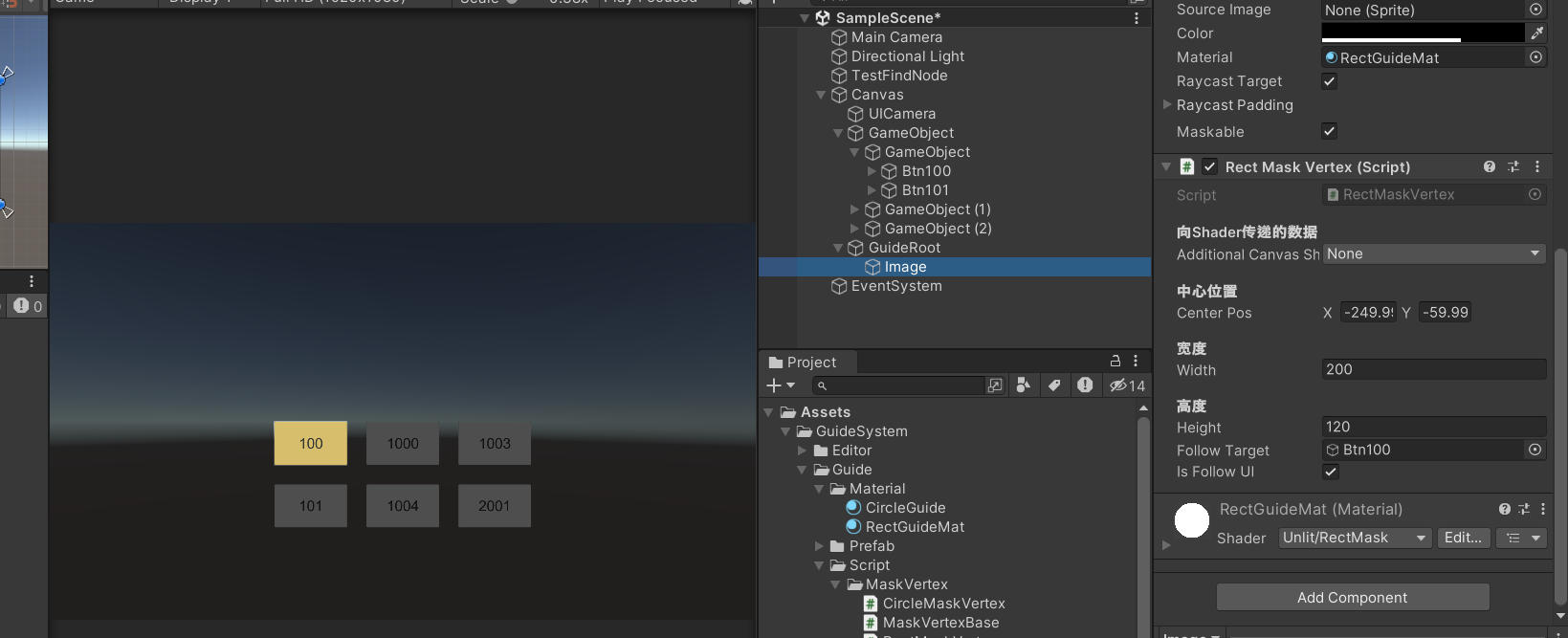
遮罩需求
目前市面上游戏的引导,基本上都采用了在需要突出的地方高亮引导玩家,通过点击等方式去触发下一步操作。所以需求就抽象成两个:
1.高亮某一块区域
2.高亮区域的点击判断和通知
高亮区域实现
高亮区域有多种做法,第一种是通过继承Unity的BaseMeshEffect去自己写顶点、三角面最后形成高亮,第二种是使用Shader通过像素的判定实现。第一种比较里面的逻辑比较复杂,所以我用的是第二种。
矩形高亮区域的C#代码
实现一个矩形高亮区域需要两个数据:矩形的中心和大小。为了使用同一个材质实现合批,我使用一个继承于BaseMeshEffect的类中(Unity提供的类不熟悉的可以查一下),在类中把这两个数据写入每个顶点中。
顶点处理基类
重写ModifyMesh方法,在其中使用抽象方法SetVertexData,传入顶点数据,并重新赋值出来。
1
2
3
4
5
6
7
8
9
10
11
12
13
14
15
16
17
18
19
20
21
22
23
24
25
26
27
28
29
30
| public abstract class MaskVertexBase : BaseMeshEffect
{
public override void ModifyMesh(VertexHelper vh)
{
if (!IsActive())
return;
List<UIVertex> vertices = new List<UIVertex>();
vh.GetUIVertexStream(vertices);
for (int i = 0; i < vertices.Count; i++)
{
UIVertex vertex = vertices[i];
vertices[i] = SetVertexData(vertex);
}
vh.Clear();
vh.AddUIVertexTriangleStream(vertices);
}
protected abstract UIVertex SetVertexData(UIVertex vertex);
}
|
矩形顶点类
在具体的矩形类中,把中心位置,高度和宽度放入顶点的uv1信息中。
1
2
3
4
5
6
7
8
9
10
11
12
13
14
15
16
17
18
19
| public class RectMaskVertex : MaskVertexBase
{
[Header("中心位置")]
public Vector2 centerPos;
[Header("宽度")]
public float width;
[Header("高度")]
public float height;
protected override UIVertex SetVertexData(UIVertex vertex)
{
vertex.uv1.x = centerPos.x;
vertex.uv1.y = centerPos.y;
vertex.uv1.z = width;
vertex.uv1.w = height;
return vertex;
}
}
|
高亮区域的Shader代码
高亮逻辑有两步:
1.在顶点着色器中获得像素的屏幕坐标位置。因为挂载的材质是在Unity的UI中所以model空间坐标直接就是屏幕坐标。
2.在片元着色器中判断像素是否需要高亮。是否需要高亮则是对应的需求。如果是在一个矩形中,则需要判断这个像素坐标位置是否在其中,在则直接输出透明,反之输出源颜色。
下面给出矩形的实现。
1
2
3
4
5
6
7
8
9
10
11
12
13
14
15
16
17
18
19
20
21
22
23
24
25
| v2f vert (appdata v)
{
v2f o;
o.screenPos = v.vertex.xy;
o.vertex = UnityObjectToClipPos(v.vertex);
o.uv = TRANSFORM_TEX(v.uv, _MainTex);
o.uv1 = v.uv1;
o.color = v.color;
return o;
}
fixed4 frag (v2f i) : SV_Target
{
fixed4 col = tex2D(_MainTex, i.uv)*i.color;
float2 centerPos = i.uv1.xy;
float width = i.uv1.z / 2;
float height = i.uv1.w / 2;
float2 offset = i.screenPos.xy - centerPos;
col.a *= (abs(offset.x) > width) || (abs(offset.y) > height);
return col;
}
|
高亮区域的点击判断和通知
判断是否点击到了高亮区域,这个逻辑需要在C#端实现。在顶点处理基类中继承了IPointerClickHandler, IPointerEnterHandler, IPointerDownHandler, IPointerUpHandler, IPointerExitHandler, IPointerMoveHandler这几个接口去监听点击输入,并且抽象了一个判断是否在高亮区域内的委托,在具体的业务中添加进来。
只需要在点击的时候执行委托进行判定,若判定为true则通过eventSystem.RaycastAll(eventData, raycastResult)获得当前高亮后的,所有的可点击物体,然后遍历去执行第一个GameObject的点击。
下面给出完整的MaskVertexBase代码
1
2
3
4
5
6
7
8
9
10
11
12
13
14
15
16
17
18
19
20
21
22
23
24
25
26
27
28
29
30
31
32
33
34
35
36
37
38
39
40
41
42
43
44
45
46
47
48
49
50
51
52
53
54
55
56
57
58
59
60
61
62
63
64
65
66
67
68
69
70
71
72
73
74
75
76
77
78
79
80
81
82
83
84
85
86
87
88
89
90
91
92
93
94
95
96
97
98
99
100
101
102
103
104
105
106
107
108
109
110
111
112
113
114
115
116
117
118
119
120
121
122
123
124
125
126
127
128
129
130
131
132
133
134
135
136
137
138
139
140
141
142
143
144
145
146
147
148
149
150
151
152
153
154
155
156
157
158
159
160
161
162
163
164
165
166
167
168
169
170
171
172
173
174
175
176
177
178
179
180
181
182
183
184
185
186
187
188
189
190
191
192
193
194
195
196
197
198
199
200
201
202
203
204
205
206
207
208
209
210
211
212
213
214
215
216
217
218
219
220
221
222
223
224
225
226
227
228
229
230
231
232
233
234
235
236
237
238
239
| using System.Collections;
using System.Collections.Generic;
using UnityEngine;
using UnityEngine.EventSystems;
using UnityEngine.UI;
public delegate bool PointerEventCallback(PointerEventData eventData);
[RequireComponent(typeof(Image))]
public abstract class MaskVertexBase : BaseMeshEffect, IPointerClickHandler, IPointerEnterHandler, IPointerDownHandler, IPointerUpHandler, IPointerExitHandler, IPointerMoveHandler
{
[Header("向Shader传递的数据")]
public AdditionalCanvasShaderChannels additionalCanvasShaderChannels;
protected Canvas canvas;
protected Camera uiCamera;
protected RectTransform canvansRect;
protected RectTransform rectTransform;
[HideInInspector]
public EventSystem eventSystem;
[HideInInspector]
public PointerEventCallback raycastLocationValid;
private List<RaycastResult> raycastResult;
private GameObject m_lastHoverGameObject;
protected virtual void OnEnable()
{
base.OnEnable();
if (canvas == null)
{
canvas = transform.GetComponentInParent<Canvas>();
uiCamera = canvas.worldCamera;
rectTransform = transform.GetComponent<RectTransform>();
canvansRect = canvas.transform.GetComponent<RectTransform>();
raycastResult = new List<RaycastResult>();
AdditionalCanvasShaderChannels();
}
}
public override void ModifyMesh(VertexHelper vh)
{
if (!IsActive())
return;
List<UIVertex> vertices = new List<UIVertex>();
vh.GetUIVertexStream(vertices);
for (int i = 0; i < vertices.Count; i++)
{
UIVertex vertex = vertices[i];
vertices[i] = SetVertexData(vertex);
}
vh.Clear();
vh.AddUIVertexTriangleStream(vertices);
}
protected abstract UIVertex SetVertexData(UIVertex vertex);
protected virtual void AdditionalCanvasShaderChannels()
{
if (canvas == null)
{
return;
}
if (additionalCanvasShaderChannels == UnityEngine.AdditionalCanvasShaderChannels.None)
{
return;
}
if ((canvas.additionalShaderChannels & additionalCanvasShaderChannels) == 0)
{
canvas.additionalShaderChannels |= additionalCanvasShaderChannels;
graphic.SetVerticesDirty();
}
}
#region 对外方法
public void SetEventSystem(EventSystem eventSystem)
{
this.eventSystem = eventSystem;
}
public bool GetLocalPointByScreenPos(Vector2 screenPos, out Vector2 localPoint)
{
if (RectTransformUtility.ScreenPointToLocalPointInRectangle(rectTransform, screenPos, uiCamera, out localPoint))
{
return true;
}
return false;
}
public bool GetLocalPointByWorldPos(Vector3 worldPos, Camera watchCamera, out Vector2 localPoint)
{
Vector3 screenPos = watchCamera.WorldToScreenPoint(worldPos);
if (GetLocalPointByScreenPos(screenPos, out localPoint))
{
return true;
}
return false;
}
public Camera GetCanvasWorldCamera()
{
return uiCamera;
}
#endregion
#region 点击实现
private void CheckAndChangeHover(GameObject newHoverGameObject, PointerEventData eventData)
{
if (newHoverGameObject != m_lastHoverGameObject)
{
if (m_lastHoverGameObject != null)
{
ExecuteEvents.Execute(m_lastHoverGameObject, eventData, ExecuteEvents.pointerExitHandler);
}
if (newHoverGameObject != null)
{
ExecuteEvents.Execute(newHoverGameObject, eventData, ExecuteEvents.pointerEnterHandler);
}
m_lastHoverGameObject = newHoverGameObject;
}
}
protected virtual GameObject PassEvent<T>(PointerEventData eventData, ExecuteEvents.EventFunction<T> function) where T : IEventSystemHandler
{
raycastResult.Clear();
eventSystem.RaycastAll(eventData, raycastResult);
bool isExecute = false;
foreach (var result in raycastResult)
{
if (result.gameObject == transform.gameObject)
{
continue;
}
isExecute = ExecuteEvents.Execute(result.gameObject, eventData, function);
return result.gameObject;
}
return null;
}
protected virtual GameObject CheckRaycastLocationValid<T>(PointerEventData eventData, ExecuteEvents.EventFunction<T> function) where T : IEventSystemHandler
{
if (raycastLocationValid != null)
{
bool isCanClick = raycastLocationValid.Invoke(eventData);
if (isCanClick)
{
return PassEvent(eventData, function);
}
if (typeof(T) == typeof(IPointerClickHandler) &&
function.Method == ExecuteEvents.pointerClickHandler.Method)
{
MessageSystem.Instance.SendMessage(MessageDefine.MASK_CLICK);
}
}
return null;
}
public virtual void OnPointerClick(PointerEventData eventData)
{
var result = CheckRaycastLocationValid(eventData, ExecuteEvents.pointerClickHandler);
if (result != null)
{
MessageSystem.Instance.SendMessage(MessageDefine.MASK_HIGH_LINGHT_CLICK);
}
}
public virtual void OnPointerEnter(PointerEventData eventData)
{
CheckRaycastLocationValid(eventData, ExecuteEvents.pointerEnterHandler);
}
public virtual void OnPointerDown(PointerEventData eventData)
{
CheckRaycastLocationValid(eventData, ExecuteEvents.pointerDownHandler);
}
public virtual void OnPointerUp(PointerEventData eventData)
{
CheckRaycastLocationValid(eventData, ExecuteEvents.pointerUpHandler);
}
public void OnPointerExit(PointerEventData eventData)
{
CheckRaycastLocationValid(eventData, ExecuteEvents.pointerExitHandler);
}
public void OnPointerMove(PointerEventData eventData)
{
GameObject enterObject = CheckRaycastLocationValid(eventData, ExecuteEvents.pointerMoveHandler);
CheckAndChangeHover(enterObject, eventData);
}
#endregion
#if UNITY_EDITOR
void OnValidate()
{
if (graphic != null)
{
graphic.SetVerticesDirty();
AdditionalCanvasShaderChannels();
}
}
#endif
}
|
遮罩预览